


Managing assignments should support learning, not create confusion or extra follow-ups. Teachers need a clear way to ask for work, review it, respond with feedback, and guide students toward improvement. Students need to know exactly what is expected and what to do next.
eProfessor now includes a new assignment submission request feature designed for teachers. You can request submissions, review student work, approve or reject it, ask for a new submission, and send feedback or messages directly to the student. Everything stays organized in one place.
This post explains how the feature works, why it matters, and how teachers can use it to improve accountability, feedback quality, and student outcomes.
Why assignment submissions need a better workflow
Many teaching platforms treat assignment submissions as a one-time event. A student uploads a file and the process ends. In real classrooms, learning rarely works that way.
Teachers often need to:
- Ask students to submit work after instruction or discussion
- Review submissions and decide if requirements were met
- Request revisions when work is incomplete or off-track
- Provide feedback that helps the student improve
- Communicate clearly about next steps
Without a structured workflow, this usually turns into email chains, missed messages, or unclear expectations. Students may not know whether their work was accepted or needs changes. Teachers lose time tracking who submitted what and who still needs to resubmit.
The new submission request feature in eProfessor solves this by creating a clear review and feedback loop inside the platform.
What the new submission request feature does
The new feature allows teachers to actively request assignment submissions and manage them through a review process.
With this update, teachers can:
- Request assignment submissions from students
- Review each submission in one place
- Approve completed work
- Reject submissions and request a new version
- Provide written feedback on submissions
- Send direct messages to students about their work
This turns assignments into a guided process rather than a single upload.
How submissions works
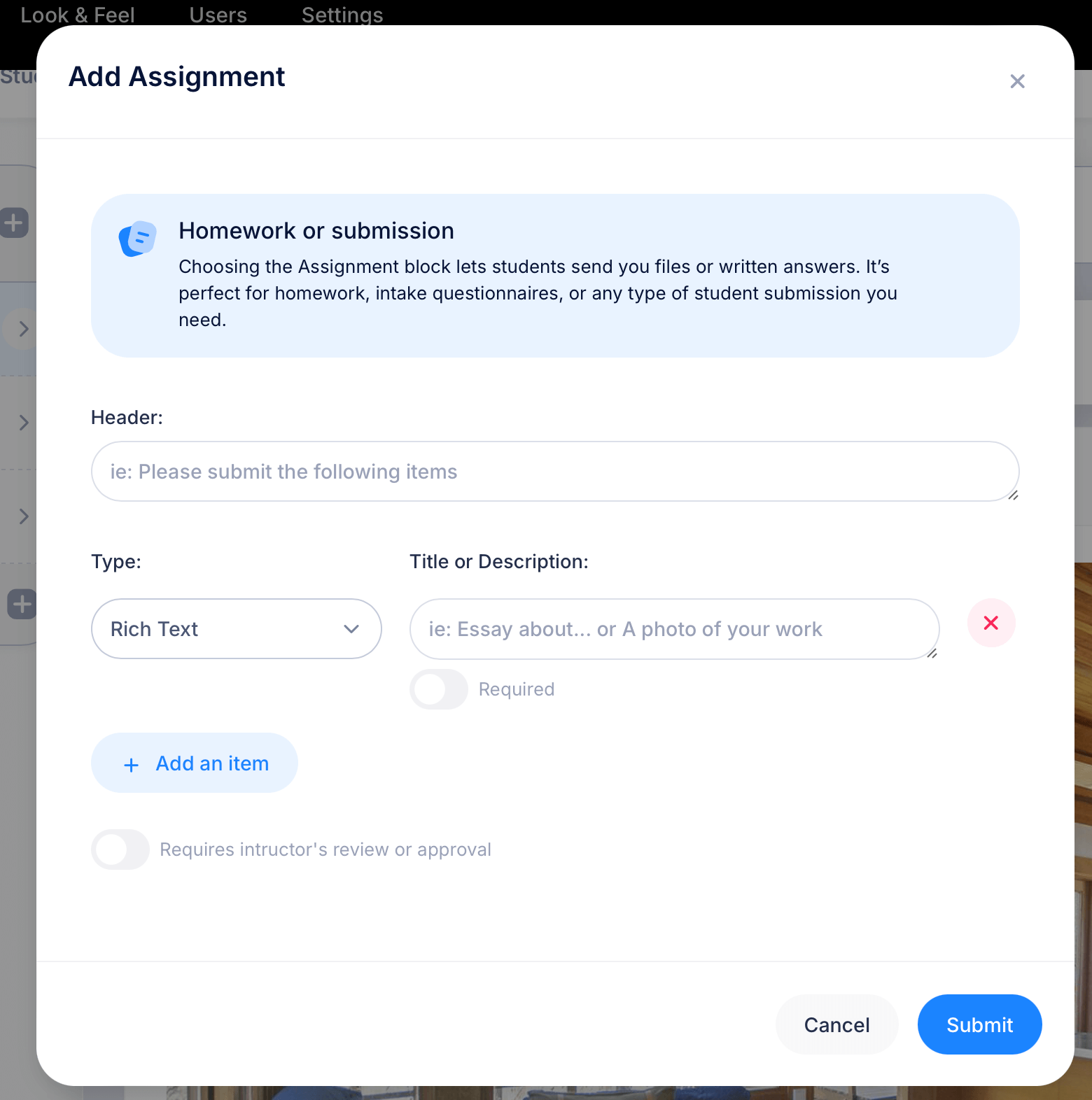
Teachers can now add a special 'Assignment" block to any of the lessons in a course.
When you request an assignment submission in eProfessor:
- Students can view that a submission is required in a lesson
- The assignment appears as an action item for the student
- Expectations are clear from the start
This is especially useful for projects, essays, lab work, or any assignment where timing and completeness matter.
Teachers stay in control of when submissions are expected, and students know exactly when action is required.
Reviewing student submissions step by step
Once students submit their work, the review process is straightforward.
Teachers can:
- Open each submission directly in eProfessor
- Review the content at their own pace
- Decide whether the submission meets the requirements
At this stage, teachers are not forced into a pass or fail decision. The platform supports real instructional judgment.
Approving submissions that meet expectations
When a submission meets the requirements:
- The teacher can approve it
- The student sees that their work has been accepted
- The assignment status is updated
Approval gives students clarity and closure. They know their work is complete and no further action is needed.
This simple confirmation helps reduce student anxiety and prevents unnecessary follow-up questions.
Rejecting submissions and requesting a new version
Not every submission will be ready on the first attempt. That is a normal part of learning.
With eProfessor, teachers can:
- Reject a submission that needs improvement
- Request a new submission from the student
- Clearly signal that revisions are required
This keeps the process structured. Students do not have to guess whether they should revise their work. The platform makes it clear that a new submission is expected.
Teachers maintain academic standards without creating friction or confusion.
Providing feedback that supports learning
Feedback is where real learning happens. The new feature makes it easy to give feedback at the right moment.
Teachers can:
- Add written feedback directly to the submission
- Explain why a submission was approved or rejected
- Offer guidance on how to improve the work
Because feedback is tied to the submission itself, students can easily connect comments to their work. There is no need to search through emails or messages.
This helps students understand expectations and apply feedback more effectively.
Sending messages to students when needed
Sometimes feedback needs more context or a quick clarification. Teachers can also send messages to students as part of the submission process.
This is useful for:
- Encouraging a student who is struggling
- Clarifying assignment requirements
- Answering questions about revisions
- Notifying a student of an upcoming deadline
Keeping communication inside eProfessor reduces scattered conversations and keeps everything related to the assignment in one place.
How this feature helps teachers save time
The submission request workflow is designed to reduce administrative work.
Teachers benefit from:
- Fewer emails and follow-ups
- Clear visibility into submission status
- Less time tracking revisions manually
- A consistent review process for all students
Instead of managing assignments across multiple tools, everything happens within eProfessor. This allows teachers to focus more on instruction and less on coordination.
How this feature helps students stay accountable
From the student perspective, clarity is key.
Students benefit from:
- Clear requests for submissions
- Immediate visibility into approval or rejection
- Specific feedback tied to their work
- Clear instructions when revisions are required
This reduces uncertainty and helps students take ownership of their learning. They know what is expected, where they stand, and what to do next.
Ideal use cases for the assignment submissions
This feature works well across many teaching scenarios, including:
- Essay and writing assignments
- Project-based learning
- Homework that requires revision
- Capstone or final projects
- Skill assessments that require practice and feedback
Any assignment that benefits from review and iteration is a good fit.
Supporting better outcomes with structured feedback
One of the biggest advantages of this feature is how it supports learning over time.
By allowing approval, rejection, and resubmission:
- Teachers reinforce standards without discouraging students
- Students learn that revision is part of the process
- Feedback becomes actionable instead of final
This aligns well with formative assessment practices and mastery-based learning models.
Getting started with assignment submissions in eProfessor
If you are already using eProfessor, the submission request feature fits naturally into your existing workflow.
If you are new to eProfessor, this feature is a strong example of how the platform supports real classroom needs. It combines assignment management, feedback, and communication into one system built for teachers.
You do not need extra tools or complicated setups. Everything works inside the platform.
Try it for your classes
If you want a clearer way to manage assignments, guide revisions, and communicate with students, this feature is ready to use.
Create your eProfessor account and start requesting assignment submissions today.
Leave a Reply